Our free Local Business Schema Generator is an online tool that helps local business owners, SEO professionals, and website developers create accurate JSON-LD structured data without coding. Simply enter your business information, and the tool generates LocalBusiness schema markup with a live preview, completeness score, and helpful suggestions for missing details. You can easily copy or download the generated schema for your website.
A Local Business Schema Generator is an online tool that helps you create structured data markup for your business website without writing code manually. It uses Schema.org LocalBusiness markup to organize important business information, such as your business name, address, phone number, opening hours, location, and services, in a format search engines can understand.
The tool generates this information in JSON-LD (JavaScript Object Notation for Linked Data), Google's recommended format for structured data implementation.
Instead of manually creating complex schema code, you simply enter your business details into the required fields. The generator automatically converts that information into properly structured JSON-LD markup, which you can add to your website to help search engines better understand your business.
Creating LocalBusiness schema markup with our free Local Business Schema Generator is simple and requires no coding knowledge. Follow these steps to generate structured data for your website.
Select the business category that best describes your business and choose the appropriate business model, such as a physical location or service-area business.
Add your business name, website URL, phone number, email address, description, logo, and other relevant details.
Enter your street address, city, state, postal code, and country. You can also include geographic coordinates and service areas where your business operates.
Provide your opening hours, services offered, and official social media profiles to make your structured data more informative.
Check the live JSON-LD preview, completeness score, and suggested improvements. Update any missing or incorrect information before proceeding.
Once satisfied, click Copy JSON-LD, Copy Script, or Download JSON to export your schema markup and add it to your website.
Our Local Business Schema Generator provides practical features to help you create, review, and export LocalBusiness structured data without manually writing JSON-LD code.
Live JSON-LD Schema Preview: View your generated JSON-LD markup in real time as you enter or update business information. This allows you to review the structured data before adding it to your website.
Business Category and Model Selection: Choose a relevant business category and business model to generate schema markup that reflects your business type, whether you operate from a physical location or serve customers across specific areas.
Detailed Business and Location Information: Include essential details such as your business name, website, contact information, address, geographic coordinates, opening hours, services, and social profiles.
Completeness Score and Actionable Suggestions: Track your schema completeness percentage and receive helpful suggestions about missing or recommended information. This guidance helps you improve your markup before exporting it.
Copy and Download Options: Easily export your generated schema using Copy JSON-LD, Copy Script, or Download JSON, depending on your implementation needs.
Schema Validation Resources: Access the Schema Markup Validator and Google Rich Results Test directly from the tool to check your structured data for errors and supported rich-result eligibility.
Local Business schema markup helps search engines better understand your business information by presenting it in a structured, machine-readable format. It provides clear details about your business name, address, phone number, location, opening hours, and services, making it easier for search engines like Google to interpret your website content.
By implementing LocalBusiness structured data, you can communicate important business details more clearly and help search engines associate your website with the correct business information.
Accurate schema markup can also support your overall local SEO strategy by reinforcing details about your business location, operating hours, and services. When your markup meets Google's requirements, your pages may be eligible for supported search enhancements.
However, adding LocalBusiness schema does not directly guarantee higher search rankings, improved local pack visibility, or rich results. It works best alongside accurate business listings, consistent contact information, and other local SEO best practices.
LocalBusiness schema markup allows you to provide structured information about your business so search engines can better understand its identity, location, and services. Our Local Business Schema Generator lets you include both essential and optional business details.
Essential Business Information:
Optional Business Information:
Including accurate, relevant details helps create more complete and informative LocalBusiness structured data.
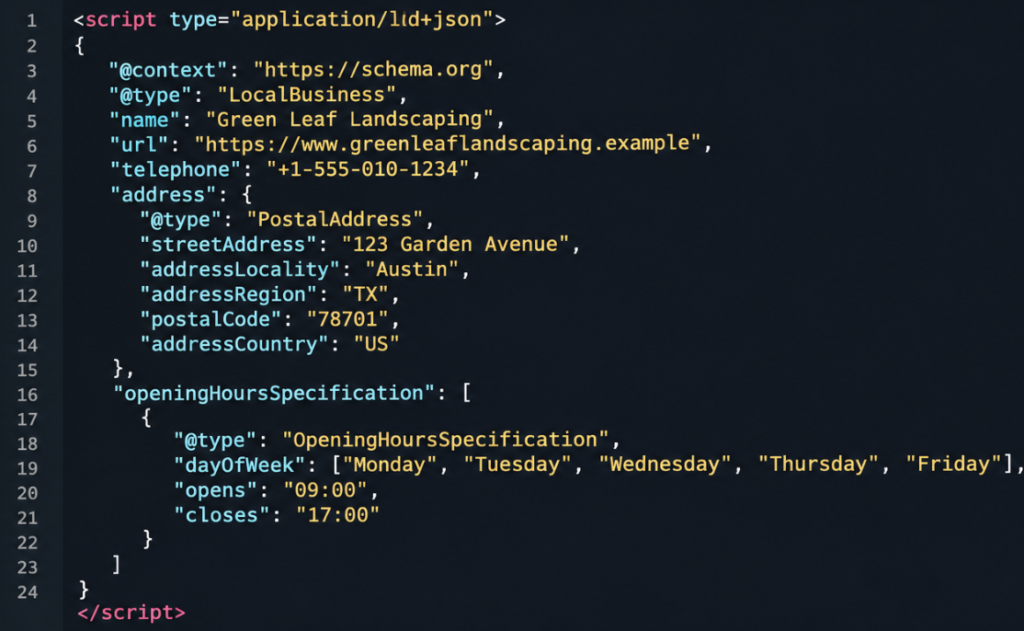
Below is an example of LocalBusiness schema markup in JSON-LD format for a fictional business called Green Leaf Landscaping. It includes essential business details in a structured format that search engines can interpret.
@context: Identifies Schema.org as the vocabulary used for structured data.
@type: Specifies the business type, such as LocalBusiness.
name: Defines the official business name.
address: Provides the business's physical address using PostalAddress.
telephone: Specifies the business contact number.
openingHoursSpecification: Defines the days and hours the business operates.
Once you've generated your LocalBusiness schema markup, the next step is to add it to your website. Google recommends using JSON-LD for structured data because it's easy to implement and maintain.
Generate your schema using our Local Business Schema Generator.
Click Copy Script to copy the JSON-LD markup, including the <script type="application/ld+json"> tags.
Open your website's HTML file and paste the code inside the <head> or <body> section.
Save your changes and publish the updated page.
Generate and copy your LocalBusiness JSON-LD script.
Use a WordPress plugin that supports adding custom scripts or structured data.
Paste the generated code into the appropriate page or site-wide script section.
Save your changes and verify that the markup appears on the published page.
Important: Check whether your website theme or SEO plugin already generates LocalBusiness schema. Avoid adding duplicate or conflicting markup, and ensure all structured data matches your actual business information.
After generating and adding your LocalBusiness schema markup to your website, it's important to validate it to identify errors and ensure the structured data is correctly formatted.
You can use these two tools to check your markup:
Schema Markup Validator: Checks your structured data against Schema.org vocabulary and identifies syntax errors, missing values, and other markup issues. It helps verify whether your JSON-LD follows Schema.org standards.
Google Rich Results Test: Checks whether your page contains structured data supported by Google's rich result features. It highlights relevant errors and warnings that may affect eligibility.
Important: Valid schema markup does not automatically guarantee Google rich results or higher search rankings. Eligibility depends on Google's supported structured data types, content guidelines, and other requirements.
When creating LocalBusiness schema markup, even small mistakes can affect how search engines interpret your business information. Here are some common errors to avoid:
Creating LocalBusiness schema is just one part of SEO. Citation Forge can help you strengthen your local search presence with professional local SEO services and quality link building. Improve your business visibility, build website authority, and support long-term organic growth.